Restaurant pre-order system: Christmas party orders without the spreadsheet

A restaurant pre-order system lets the organiser of a group booking send everyone’s menu choices online before the day. The choices come straight from the menu on your website, and each order becomes ready-made lists: one for the organiser, one for front of house showing who’s having what, and one for the kitchen with the total of each dish.

For most restaurants, Christmas pre-orders still mean PDF menus, emails with choices typed out a different way each time, and an evening spent copying it all into a spreadsheet. Get one line wrong and someone sits down to a meal they didn’t order.

This autumn we built a pre-order system for The Black Horse, a country pub and restaurant in Ireland, Bedfordshire. Here’s how it works, and what to think about if you’d like one for your own restaurant.

In this post:

  • Why group pre-orders get messy
  • How the Black Horse pre-order system works
  • Three PDFs, three different jobs
  • The details that matter on the night
  • Not just for Christmas
  • Is a pre-order system right for your restaurant?
Retro illustration of a woman in a paper crown holding a Christmas dinner plate under a red “Reserved” stamp.

Why group pre-orders get messy

Group pre-orders get messy because the choices arrive in a different format every time, and someone has to turn them into something the kitchen can cook from.

Before the new system, Jess, who looks after Christmas, the marketing and the website at The Black Horse, kept a spreadsheet for every large party. Choices came in by email or on an old order form, and each one was copied across by hand. Every time the Christmas menu changed, the form needed changing too, which meant waiting for James to update it.

Keeping several copies of the same menu in step is harder than it sounds. When Jess copied the Christmas Eve menu into the new system, it showed up dishes missing from the version going to print, and she caught them before the menus went to the printers.

Dietary needs add another layer. With twenty people choosing, it’s easy to miss that someone has picked a dish that isn’t suitable for them until the week of the booking.

How the Black Horse pre-order system works

The Black Horse pre-order system builds the order form from the menu on the website, so there’s only one menu to keep up to date.

Jess adds each festive menu in WordPress the same way as any other menu: the dishes, their dietary labels (vegetarian, vegan, gluten free and so on), the prices and the dates it’s served. The order form at the bottom of the menu page fills itself in from that. You can see it at the bottom of the Black Horse festive menu.

The organiser then:

  1. enters the booking name, their contact details and the number in the party
  2. picks the date and time (if a menu is only served on one day, the date is set for them)
  3. adds a row for each guest, with their name and any dietary requirement
  4. chooses each guest’s starter, main and dessert, with anything unsuitable greyed out

Once it’s sent, everyone who needs a copy gets one by email. It’s built on Gravity Forms, the form plugin we use on most of our WordPress sites.

Change the menu and the form changes with it. Swap a dish, add a new menu or change the dates in WordPress, and the pre-order form updates straight away. There’s no second copy to keep in step, and no waiting for your web designer.

Three PDFs, three different jobs

Each pre-order creates three PDFs, because the organiser, front of house and the kitchen each need to see the same order in a different way.

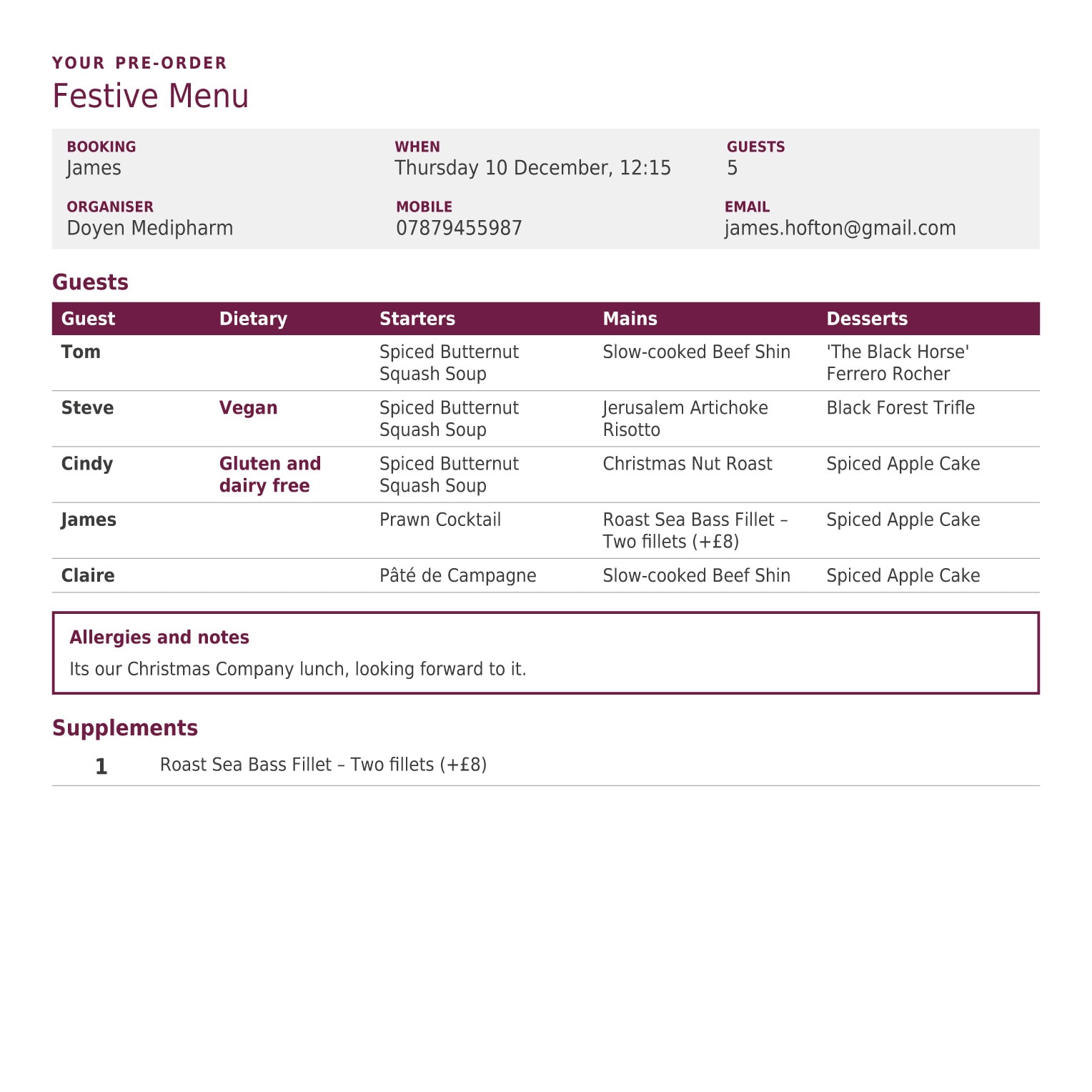
Example of pre-order PDF

For the organiser

A copy of everyone’s choices, emailed straight to them. They can check it, share it with the group and bring it on the day, so nobody has to remember what they ordered three weeks ago.

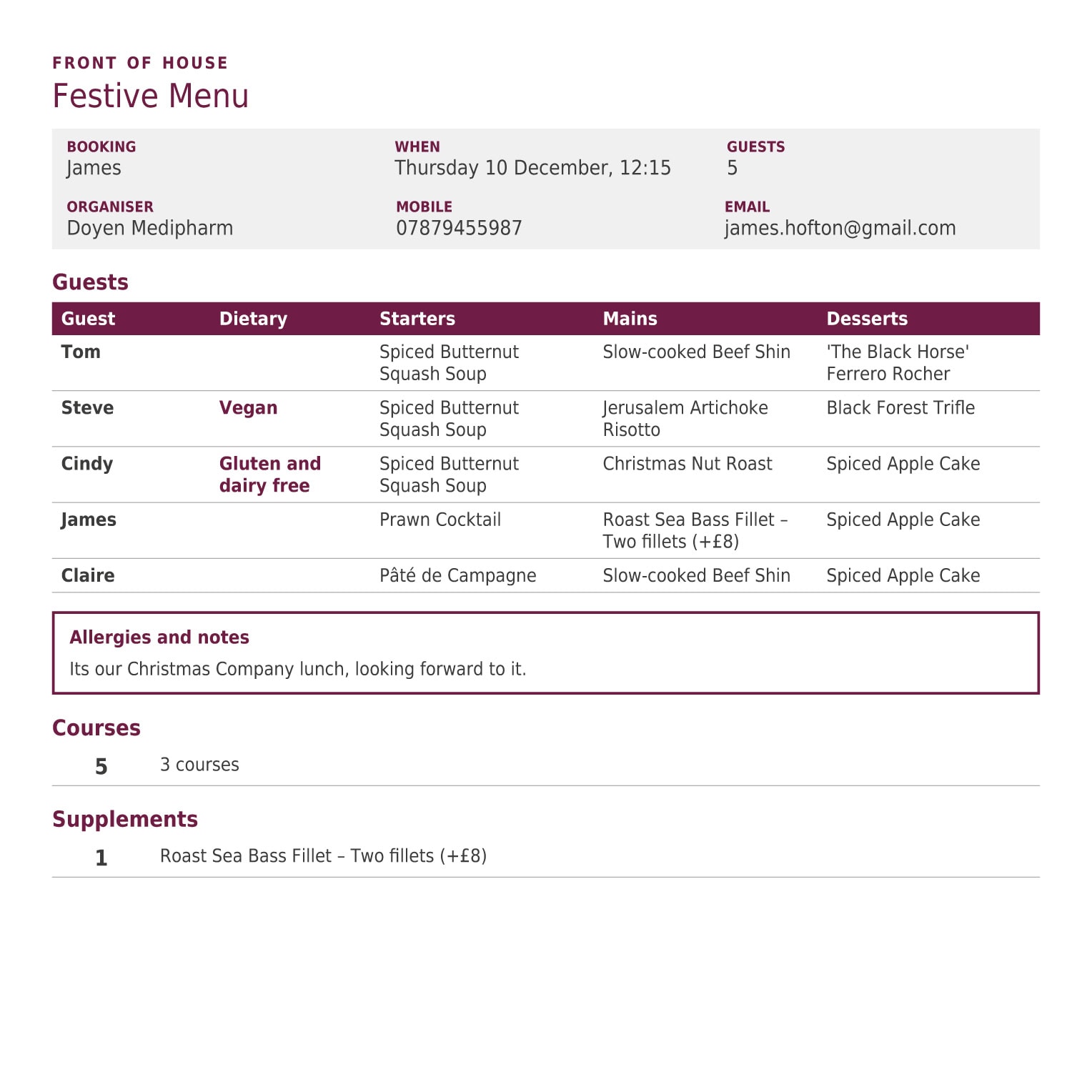
Example of front of house PDF

For front of house

Each guest’s name with the dishes they’ve chosen and any dietary notes. Staff know who’s having what before the first plate leaves the kitchen.

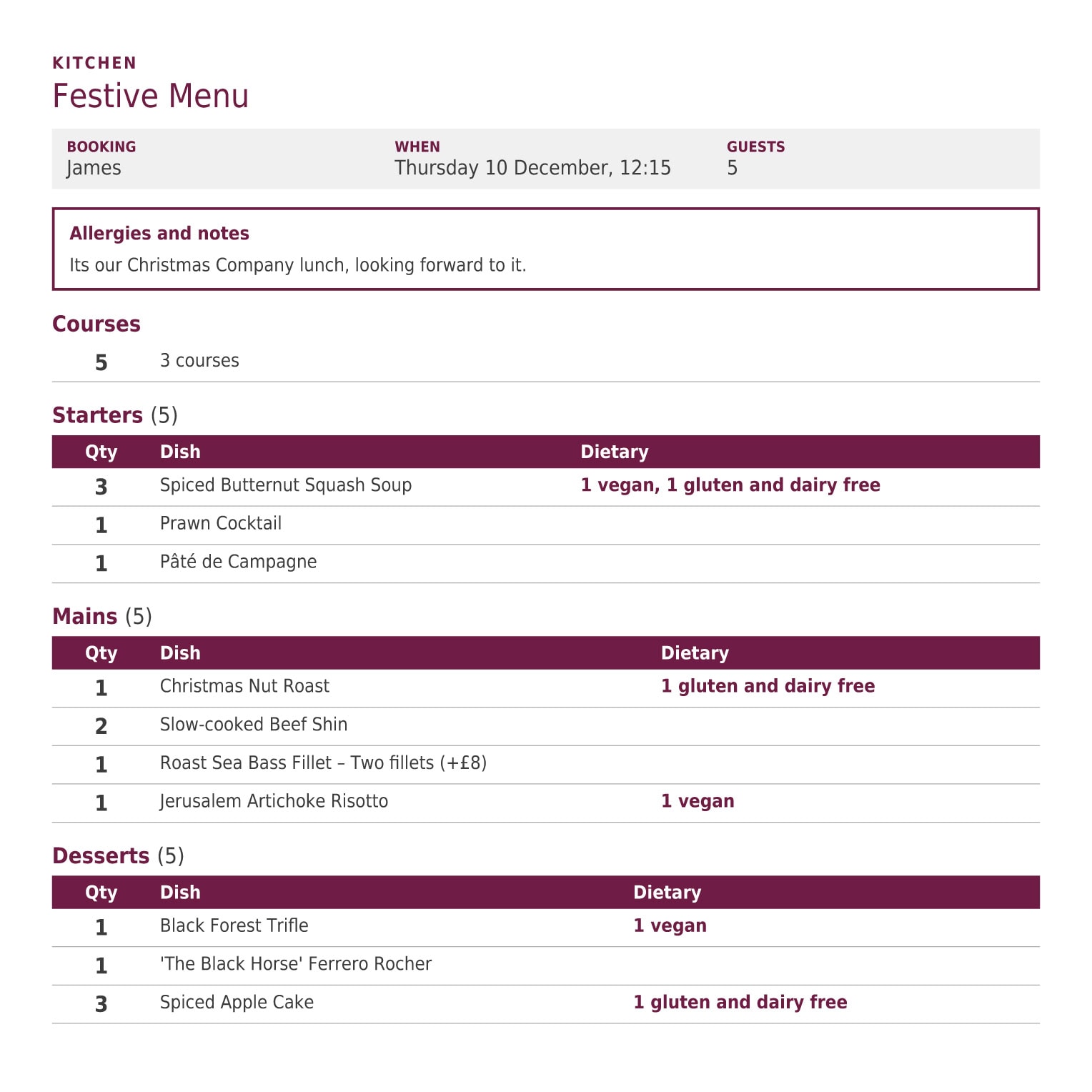
Festive menu items including vegan and gluten-free options at Union 10 Design.

For the kitchen

The total for each dish, such as 12 butternut squash soups and 8 roasted pears, with no names. Just what needs cooking, along with any important dietary adaptations clearly highlighted, in a list that’s quick to read on a busy service.

The details that matter on the night

Most of the work in a restaurant pre-order system goes into the small rules that stop mistakes before they happen. On the Black Horse system:

  • Each menu sets its own courses. The festive lunch can be two or three courses, while Christmas Eve and New Year’s Eve are three courses only, so nobody can skip the main.
  • Dietary needs come first. Choosing vegan or gluten free for a guest greys out anything that isn’t suitable, and dishes that can be adapted stay available.
  • Big parties fit in one order. The form takes up to 50 guests, so a whole office party goes in together.
  • Children’s choices have a place. The children’s menu is separate, so there’s a box for those choices and anything else the kitchen should know.
  • A table comes first. Before sending, the organiser ticks to confirm they have a confirmed booking, so a pre-order is never mistaken for a reservation.

Rules like these come from the people who run the restaurant. Most of them came out of calls with Jess while she tested the form, which is why we always build tools like this with the team who’ll use them every day.

“I’m currently processing the food order forms that are coming in from customers, and I just wanted to let you know how fantastic they are. You have done an incredible job and they have made the process so much easier and smoother.”

Jess Campbell, The Black Horse

Not just for Christmas

A menu-driven pre-order system works for any meal where you want choices before the day, not only Christmas.

Because the form is built from whichever menu it sits on, the same system can take pre-orders for a music night with dinner, a Mother’s Day lunch, a set menu for a private room or a wedding breakfast. Add the menu, set the dates and the form is ready.

It also keeps your menus as proper web pages rather than PDFs, which is better for your customers on a phone and better for search. Our guide to restaurant website design covers why that matters.

Is a pre-order system right for your restaurant?
A pre-order system is worth it if you take regular group bookings on set menus, and the bigger the parties, the more time it saves. It’s probably not worth it if you only take the odd group booking, or your booking system already handles pre-orders in a way your kitchen is happy with.

It doesn’t replace your table booking system. The Black Horse still takes reservations as before, and the pre-order form handles everything after the table is booked. If you’re looking at that side too, we’ve written about choosing an online restaurant reservation system.

Pre-order forms are one of the custom tools we build for WordPress websites, and they sit naturally alongside our restaurant website design.

FAQs

FAQs

If you have a question, please use our short form here to send it over. We’re always happy to chat.

It’s an online form that lets the organiser of a group booking send everyone’s menu choices before the day. The restaurant gets the choices as tidy lists for front of house and the kitchen, instead of emails to copy into a spreadsheet.

No. Your booking system still takes the reservation. The pre-order form collects the food choices once the table is booked, and can ask the organiser to confirm they have a booking before they send it.

Yes. The form is built from the menu on your website, so when you change a dish, a price or the dates, the form updates straight away. Orders that have already come in keep the choices that were made at the time.

Guests choose their dietary requirement first, and dishes that aren’t suitable are greyed out. There’s also a box for anything else the kitchen needs to know. It helps, but it doesn’t replace your own allergen checks, so follow the Food Standards Agency’s allergen guidance as usual.

It’s up to you, and the form can say so. The Black Horse asks for everyone’s choices at least three weeks before the booking, which gives the kitchen time to order in.

It can, as Gravity Forms can take card payments. The Black Horse doesn’t use it, because card details are taken when the table is booked, so their pre-order form only collects the food choices.

The bottom line

A good restaurant pre-order system means the menu is written once, the organiser fills in one form, and front of house and the kitchen each get the list they need. For The Black Horse, it’s replaced the Christmas spreadsheet and a lot of back and forth.

If you’d like a pre-order system for your restaurant, or want to talk through how one would work with your menus, we’re always happy to chat.

Last updated: November 2026

Written by James Hofton, reviewed by Jane Comar

Last updated: 19 November 2026

Get in touch


Talk to us about your next project. We’d love to hear from you.